pytorch layers#
1. Conv1d#
Overview#
Conv1d is used for applying 1-dimensional convolutional operations on input data. This layer is commonly used in processing sequential data such as time series, audio signals, and other 1D data.
Example#
import torch
import torch.nn as nn

# Define a 1D convolutional layer
conv1d = nn.Conv1d(in_channels=1, out_channels=3, kernel_size=2)

# Example input (batch_size=1, in_channels=1, sequence_length=4)
input_tensor = torch.tensor([[[1.0, 2.0, 3.0, 4.0]]])

# Apply the convolutional layer
output_tensor = conv1d(input_tensor)

print(output_tensor)
Differences and Use Cases#
Use Case: Audio signal processing, time series forecasting, and other 1D data tasks.
When to Use: When working with data that has a single spatial dimension.
2. Conv2d#
Overview#
Conv2d applies 2-dimensional convolutional operations, which are essential for image processing tasks. This layer is widely used in computer vision applications.
Example#
import torch
import torch.nn as nn

# Define a 2D convolutional layer
conv2d = nn.Conv2d(in_channels=1, out_channels=3, kernel_size=3)

# Example input (batch_size=1, in_channels=1, height=5, width=5)
input_tensor = torch.tensor([[[[1.0, 2.0, 3.0, 4.0, 5.0],
                               [1.0, 2.0, 3.0, 4.0, 5.0],
                               [1.0, 2.0, 3.0, 4.0, 5.0],
                               [1.0, 2.0, 3.0, 4.0, 5.0],
                               [1.0, 2.0, 3.0, 4.0, 5.0]]]])

# Apply the convolutional layer
output_tensor = conv2d(input_tensor)

print(output_tensor)
Differences and Use Cases#
Use Case: Image classification, object detection, and other computer vision tasks.
When to Use: When dealing with 2D data such as images or videos.
3. AdaptiveAvgPool1d#
Overview#
AdaptiveAvgPool1d performs adaptive average pooling over a 1-dimensional input signal. This layer outputs a tensor with a specified output size, regardless of the input size.
Example#
import torch
import torch.nn as nn

# Define an adaptive average pooling layer
adaptive_avg_pool1d = nn.AdaptiveAvgPool1d(output_size=2)

# Example input (batch_size=1, in_channels=1, sequence_length=4)
input_tensor = torch.tensor([[[1.0, 2.0, 3.0, 4.0]]])

# Apply the pooling layer
output_tensor = adaptive_avg_pool1d(input_tensor)

print(output_tensor)
Differences and Use Cases#
Use Case: Used in models where the output size must be fixed regardless of the input size, such as in fully connected layers.
When to Use: When a specific output size is required for further processing.
4. Flatten#
Overview#
Flatten is used to flatten the input tensor into a single dimension. This layer is typically used before fully connected (linear) layers.
Example#
import torch
import torch.nn as nn

# Define a flatten layer
flatten = nn.Flatten()

# Example input (batch_size=1, in_channels=1, height=2, width=2)
input_tensor = torch.tensor([[[[1.0, 2.0],
                               [3.0, 4.0]]]])

# Apply the flatten layer
output_tensor = flatten(input_tensor)

print(output_tensor)
Differences and Use Cases#
Use Case: Used in neural networks to prepare data for fully connected layers.
When to Use: When transitioning from convolutional layers to fully connected layers.
5. Bilinear#
Overview#
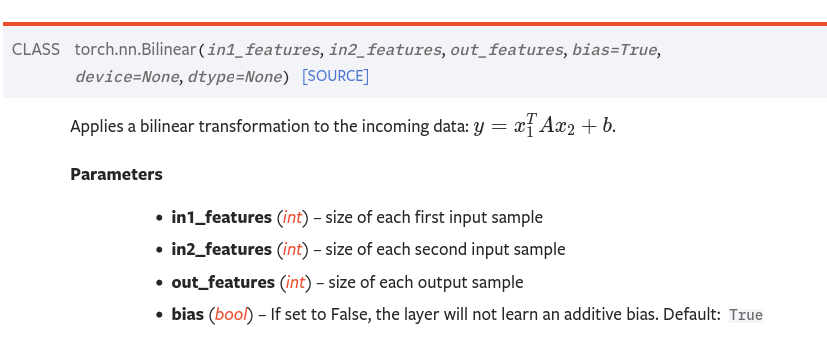
Bilinear applies a bilinear transformation to the input data. It is useful for models that require interactions between two different input features.
Example#
import torch
import torch.nn as nn

# Define a bilinear layer
bilinear = nn.Bilinear(in1_features=3, in2_features=3, out_features=2)

# Example input (batch_size=1, features=3)
input1 = torch.tensor([[1.0, 2.0, 3.0]])
input2 = torch.tensor([[4.0, 5.0, 6.0]])

# Apply the bilinear layer
output_tensor = bilinear(input1, input2)

print(output_tensor)
Differences and Use Cases#
Use Case: Used in models where interactions between two different sets of features are important, such as in attention mechanisms.
When to Use: When combining two different input features to generate an output.