AutoML#
Building a loop which evaluates the hyper parameters of the feature engineering steps to maximize the score.
Feature tools operates on an idea known as Deep Feature Synthesis.
The concept of Deep Feature Synthesis is to use basic building blocks known as feature primitives (like the transformations and aggregations done above) that can be stacked on top of each other to form new features. The depth of a “deep feature” is equal to the number of stacked primitives.
usage#
The first part of Feature Tools to understand is an entity. This is simply a table, or in pandas, a DataFrame.
We corral multiple entities into a single object called an EntitySet. This is just a large data structure composed of many individual entities and the relationships between them.
creating an entity set#
es = ft.EntitySet(id = 'clients')
Each entity must have a uniquely identifying column, known as an index
If the data does not have a unique index we can tell feature tools to make an index for the entity by passing in make_index = True
If the data also has a uniquely identifying time index, we can pass that in as the time_index parameter.
Feature tools will automatically infer the variable types (numeric, categorical, datetime) of the columns in our data
add to set#
# Create an entity from the client dataframe
# This dataframe already has an index and a time index
es = es.entity_from_dataframe(entity_id = 'clients', dataframe = clients,
                              index = 'client_id', time_index = 'joined')
# Create an entity from the loans dataframe
# This dataframe already has an index and a time index
es = es.entity_from_dataframe(entity_id = 'loans', dataframe = loans,
                              variable_types = {'repaid': ft.variable_types.Categorical},
                              index = 'loan_id',
                              time_index = 'loan_start')
# Create an entity from the payments dataframe
# This does not yet have a unique index
es = es.entity_from_dataframe(entity_id = 'payments',
                              dataframe = payments,
                              variable_types = {'missed': ft.variable_types.Categorical},
                              make_index = True,
                              index = 'payment_id',
                              time_index = 'payment_date')
show
> es

Entityset: clients
  Entities:
    clients [Rows: 25, Columns: 6]
    loans [Rows: 443, Columns: 8]
    payments [Rows: 3456, Columns: 5]
  Relationships:
    No relationships


> es['loans']

Entity: loans
  Variables:
    client_id (dtype: numeric)
    loan_type (dtype: categorical)
    loan_amount (dtype: numeric)
    loan_start (dtype: datetime_time_index)
    loan_end (dtype: datetime)
    rate (dtype: numeric)
    repaid (dtype: categorical)
    loan_id (dtype: index)
  Shape:
    (Rows: 443, Columns: 8)
relationships#
way to think of relationships is with the parent to child analogy: a parent-to-child relationship is one-to-many because for each parent, there can be multiple children
These relationships are what allow us to group together datapoints using aggregation primitives and then create new features
codify relationships in the language of feature tools by specifying the parent variable and then the child variable then add to the set:
# Relationship between clients and previous loans
r_client_previous = ft.Relationship(es['clients']['client_id'],
                                    es['loans']['client_id'])

# Add the relationship to the entity set
es = es.add_relationship(r_client_previous)
Feature Primitives#
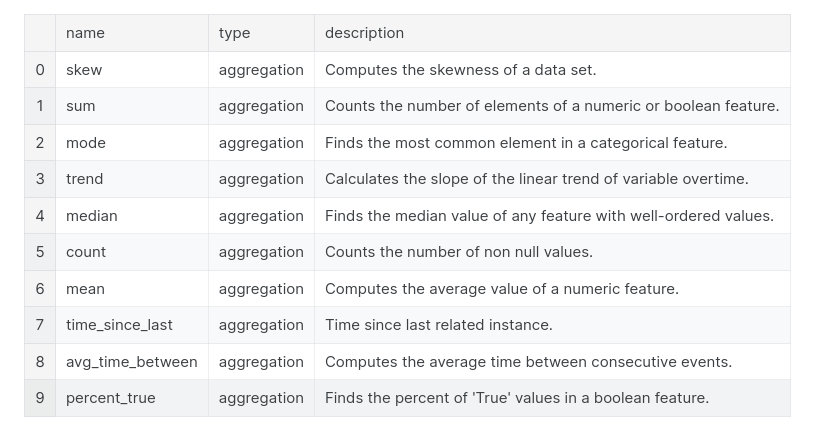
Aggregation: function that groups together child datapoints for each parent and then calculates a statistic such as mean, min, max, or standard deviation.
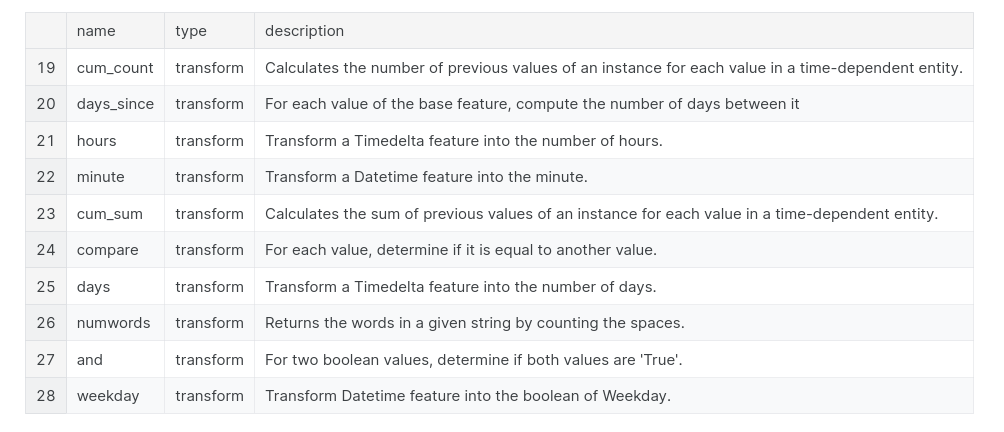
Transformation: an operation applied to one or more columns in a single table. An example would be extracting the day from dates, or finding the difference between two columns in one table.
primitives = ft.list_primitives()
pd.options.display.max_colwidth = 100
primitives[primitives['type'] == 'aggregation'].head(10)
primitives[primitives['type'] == 'transform'].head(10)
feature primitives#
we specify the entityset to use; the target_entity, which is the dataframe we want to make the features for (where the features end up); the agg_primitives which are the aggregation feature primitives; and the trans_primitives which are the transformation primitives to apply
# Create new features using specified primitives
features, feature_names = ft.dfs(entityset = es, target_entity = 'clients',
                                 agg_primitives = ['mean', 'max', 'percent_true', 'last'],
                                 trans_primitives = ['years', 'month', 'divide'])
deep feature synthesis#
The depth of a feature is simply the number of primitives required to make a feature
# Show a feature with a depth of 1
pd.DataFrame(features['MEAN(loans.loan_amount)'].head(10))
# Show a feature with a depth of 2
pd.DataFrame(features['LAST(loans.MEAN(payments.payment_amount))'].head(10))
Automated Deep Feature Synthesis#
do this by making the same ft.dfs function call, but without passing in any primitives
just set the max_depth parameter and feature tools will automatically try many all combinations of feature primitives to the ordered depth
# Perform deep feature synthesis without specifying primitives
features, feature_names = ft.dfs(entityset=es, target_entity='clients',
                                 max_depth = 2)