
Local Outlier Factor#
Notebook by:
Royi Avital RoyiAvital@fixelalgorithms.com
Revision History#
Version |
Date |
User |
Content / Changes |
|---|---|---|---|
1.0.000 |
13/04/2024 |
Royi Avital |
First version |

# Import Packages

# General Tools
import numpy as np
import scipy as sp
import pandas as pd

# Machine Learning
from sklearn.datasets import make_moons
from sklearn.neighbors import LocalOutlierFactor

# Miscellaneous
import math
import os
from platform import python_version
import random
import timeit

# Typing
from typing import Callable, Dict, List, Optional, Self, Set, Tuple, Union

# Visualization
import matplotlib as mpl
import matplotlib.pyplot as plt
import seaborn as sns

# Jupyter
from IPython import get_ipython
from IPython.display import Image
from IPython.display import display
from ipywidgets import Dropdown, FloatSlider, interact, IntSlider, Layout, SelectionSlider
from ipywidgets import interact
Notations#
(?) Question to answer interactively.
(!) Simple task to add code for the notebook.
(@) Optional / Extra self practice.
(#) Note / Useful resource / Food for thought.
Code Notations:
someVar    = 2; #<! Notation for a variable
vVector    = np.random.rand(4) #<! Notation for 1D array
mMatrix    = np.random.rand(4, 3) #<! Notation for 2D array
tTensor    = np.random.rand(4, 3, 2, 3) #<! Notation for nD array (Tensor)
tuTuple    = (1, 2, 3) #<! Notation for a tuple
lList      = [1, 2, 3] #<! Notation for a list
dDict      = {1: 3, 2: 2, 3: 1} #<! Notation for a dictionary
oObj       = MyClass() #<! Notation for an object
dfData     = pd.DataFrame() #<! Notation for a data frame
dsData     = pd.Series() #<! Notation for a series
hObj       = plt.Axes() #<! Notation for an object / handler / function handler
Code Exercise#
Single line fill
vallToFill = ???
Multi Line to Fill (At least one)
# You need to start writing
????
Section to Fill
#===========================Fill This===========================#
# 1. Explanation about what to do.
# !! Remarks to follow / take under consideration.
mX = ???

???
#===============================================================#
# Configuration
# %matplotlib inline

seedNum = 512
np.random.seed(seedNum)
random.seed(seedNum)

# Matplotlib default color palette
lMatPltLibclr = ['#1f77b4', '#ff7f0e', '#2ca02c', '#d62728', '#9467bd', '#8c564b', '#e377c2', '#7f7f7f', '#bcbd22', '#17becf']
# sns.set_theme() #>! Apply SeaBorn theme

runInGoogleColab = 'google.colab' in str(get_ipython())
# Constants

FIG_SIZE_DEF    = (8, 8)
ELM_SIZE_DEF    = 50
CLASS_COLOR     = ('b', 'r')
EDGE_COLOR      = 'k'
MARKER_SIZE_DEF = 10
LINE_WIDTH_DEF  = 2
# Courses Packages
import sys
sys.path.append('../')
sys.path.append('../../')
sys.path.append('../../../')
from utils.DataVisualization import PlotScatterData
# General Auxiliary Functions
Anomaly Detection by Local Outlier Factor (LOF)#
This notebook covers Anomaly Detection by utilizing the Local Outlier Factor (LOF) algorithm.
Working on synthetic data.
Working with the
LocalOutlierFactorclass.Effect of the parameters on the detection.
(#) Anomaly Detection can be part of the pre process stage to clean data or the objective by itself.
# Parameters

# Data
numSamples = 500
noiseLevel = 0.1

# Model
numNeighbors        = 30
contaminationRatio  = 0.05
Generate / Load Data#
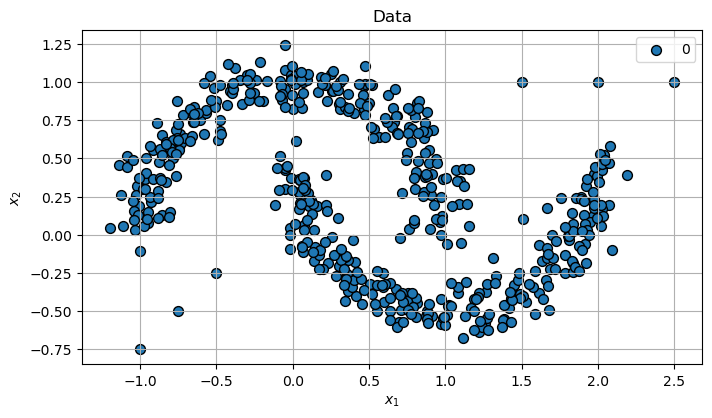
In this notebook we’ll use the make_moons() data generator.
# Generate Data

mX, vY = make_moons(n_samples = numSamples, noise = noiseLevel)

vX1 = np.linspace(-1.00, -0.50, 3)
vX2 = np.linspace(-0.75, -0.25, 3)

mX = np.concatenate((mX, np.column_stack((vX1, vX2))), axis = 0)

vX1 = np.linspace(1.50, 2.50, 3)
vX2 = np.ones(3)

mX = np.concatenate((mX, np.column_stack((vX1, vX2))), axis = 0)

print(f'The features data shape: {mX.shape}')
print(f'The features data type: {mX.dtype}')
The features data shape: (506, 2)
The features data type: float64
Plot the Data#
# Plot the Data

hF, hA = plt.subplots(figsize = (8, 8))
hA = PlotScatterData(mX, markerSize = 50, hA = hA)
hA.set_aspect(1)
hA.set_title('Data')

plt.show()
Applying Outlier Detection - Local Outlier Factor (LOF)#
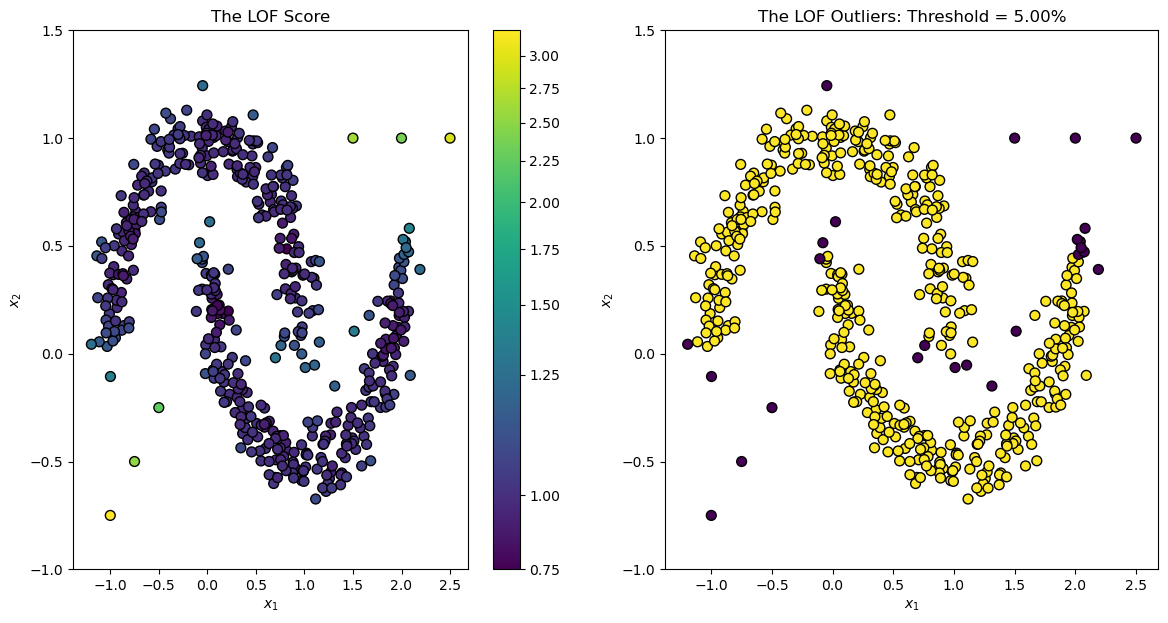
The LOF algorithm basically learns the density of the distance to local neighbors and when the density is much lower than expected it sets the data as an outlier.
(#) The LOF is implemented by
LocalOutlierFactorthe class in SciKit Learn.
# Applying the Model

oLofOutDet = LocalOutlierFactor(n_neighbors = numNeighbors, contamination = contaminationRatio)
vL         = oLofOutDet.fit_predict(mX)
vLofScore  = -oLofOutDet.negative_outlier_factor_
Plot the Model Results#
We can use the model to show the LOF Score.
# Plot the Model
from matplotlib.colors import PowerNorm
hF, hA = plt.subplots(nrows = 1, ncols = 2, figsize = (14, 7))

hPathColl = hA[0].scatter(mX[:, 0], mX[:, 1], s = 50, c = vLofScore, norm = PowerNorm(0.5), edgecolors = EDGE_COLOR)
# hA[0].axis('equal')
hA[0].set_ylim((-1, 1.5))
hA[0].set_xlabel('${{x}}_{{1}}$')
hA[0].set_ylabel('${{x}}_{{2}}$')
hA[0].set_title('The LOF Score')

hA[1].scatter(mX[:, 0], mX[:, 1], s = 50, c = vL, edgecolors = EDGE_COLOR)
# hA[1].axis('equal')
hA[1].set_ylim((-1, 1.5))
hA[1].set_xlabel('${{x}}_{{1}}$')
hA[1].set_ylabel('${{x}}_{{2}}$')
hA[1].set_title(f'The LOF Outliers: Threshold = {contaminationRatio:0.2%}')

hF.colorbar(hPathColl, ax = hA[0])

plt.show()
Analysis of the LOF Score Histogram#
hF, hA = plt.subplots(figsize = (14, 7))

sns.histplot(x = vLofScore, ax = hA)
plt.show()
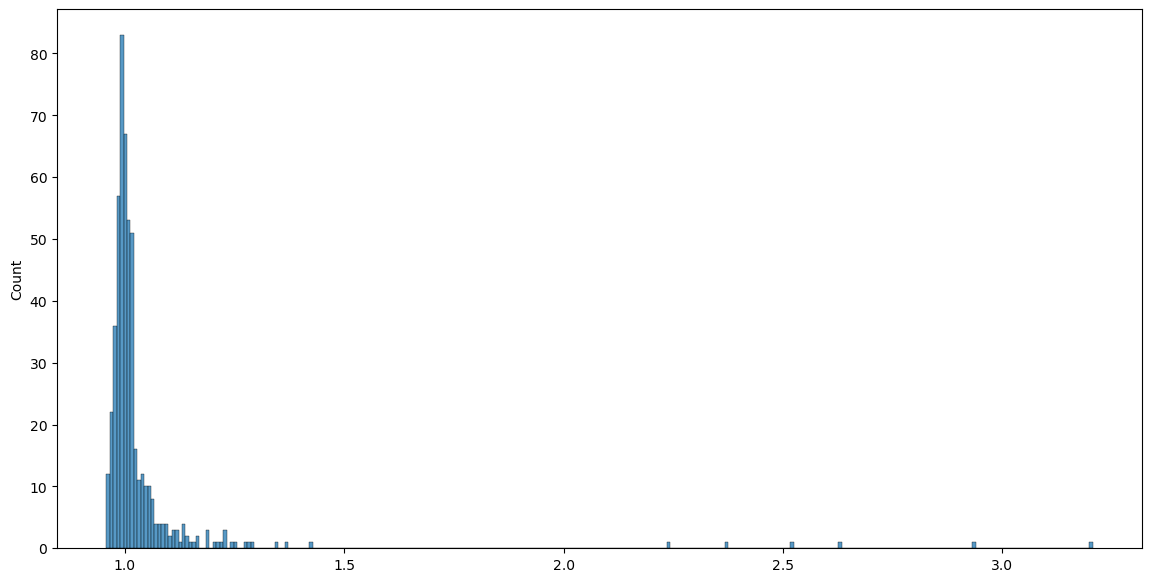
(?) Will a change in the
contaminationparameter change the histogram above?(@) Think of strategy to have an adaptive threshold of outliers based on the histogram.
?#
???? use gmm ???