Transforms v2: End-to-end object detection/segmentation example#
object detection and segmentation tasks are natively supported:
torchvision.transforms.v2 enables jointly transforming images, videos,
bounding boxes, and masks.
This example showcases an end-to-end instance segmentation training case using
Torchvision utils from torchvision.datasets, torchvision.models and
torchvision.transforms.v2. Everything covered here can be applied similarly
to object detection or semantic segmentation tasks.
help functions:#
import matplotlib.pyplot as plt
import torch
from torchvision.utils import draw_bounding_boxes, draw_segmentation_masks
from torchvision import tv_tensors
from torchvision.transforms.v2 import functional as F


def plot(imgs, row_title=None, **imshow_kwargs):
    if not isinstance(imgs[0], list):
        # Make a 2d grid even if there's just 1 row
        imgs = [imgs]

    num_rows = len(imgs)
    num_cols = len(imgs[0])
    _, axs = plt.subplots(nrows=num_rows, ncols=num_cols, squeeze=False)
    for row_idx, row in enumerate(imgs):
        for col_idx, img in enumerate(row):
            boxes = None
            masks = None
            if isinstance(img, tuple):
                img, target = img
                if isinstance(target, dict):
                    boxes = target.get("boxes")
                    masks = target.get("masks")
                elif isinstance(target, tv_tensors.BoundingBoxes):
                    boxes = target
                else:
                    raise ValueError(f"Unexpected target type: {type(target)}")
            img = F.to_image(img)
            if img.dtype.is_floating_point and img.min() < 0:
                # Poor man's re-normalization for the colors to be OK-ish. This
                # is useful for images coming out of Normalize()
                img -= img.min()
                img /= img.max()

            img = F.to_dtype(img, torch.uint8, scale=True)
            if boxes is not None:
                img = draw_bounding_boxes(img, boxes, colors="yellow", width=3)
            if masks is not None:
                img = draw_segmentation_masks(img, masks.to(torch.bool), colors=["green"] * masks.shape[0], alpha=.65)

            ax = axs[row_idx, col_idx]
            ax.imshow(img.permute(1, 2, 0).numpy(), **imshow_kwargs)
            ax.set(xticklabels=[], yticklabels=[], xticks=[], yticks=[])

    if row_title is not None:
        for row_idx in range(num_rows):
            axs[row_idx, 0].set(ylabel=row_title[row_idx])

    plt.tight_layout()
main#
import pathlib

import torch
import torch.utils.data

from torchvision import models, datasets, tv_tensors
from torchvision.transforms import v2

torch.manual_seed(0)

# This loads fake data for illustration purposes of this example. In practice, you'll have
# to replace this with the proper data.
# If you're trying to run that on collab, you can download the assets and the
# helpers from https://github.com/pytorch/vision/tree/main/gallery/
ROOT = pathlib.Path("/data/solai/tmp30/assets") / "coco"
IMAGES_PATH = str(ROOT / "images")
ANNOTATIONS_PATH = str(ROOT / "instances.json")
# from helpers import plot
ROOT
PosixPath('/data/solai/tmp30/assets/coco')
Dataset preparation#
We start off by loading the :class:~torchvision.datasets.CocoDetection dataset to have a look at what it currently
returns.
dataset = datasets.CocoDetection(IMAGES_PATH, ANNOTATIONS_PATH)

sample = dataset[0]
img, target = sample
print(f"{type(img) = }\n{type(target) = }\n{type(target[0]) = }\n{target[0].keys() = }")
loading annotations into memory...
Done (t=0.00s)
creating index...
index created!
type(img) = <class 'PIL.Image.Image'>
type(target) = <class 'list'>
type(target[0]) = <class 'dict'>
target[0].keys() = dict_keys(['segmentation', 'iscrowd', 'image_id', 'bbox', 'category_id', 'id'])
Torchvision datasets preserve the data structure and types as it was intended by the datasets authors. So by default, the output structure may not always be compatible with the models or the transforms.
To overcome that, we can use the
:func:~torchvision.datasets.wrap_dataset_for_transforms_v2 function. For
:class:~torchvision.datasets.CocoDetection, this changes the target
structure to a single dictionary of lists:
dataset = datasets.wrap_dataset_for_transforms_v2(dataset, target_keys=("boxes", "labels", "masks"))

sample = dataset[0]
img, target = sample
print(f"{type(img) = }\n{type(target) = }\n{target.keys() = }")
print(f"{type(target['boxes']) = }\n{type(target['labels']) = }\n{type(target['masks']) = }")
type(img) = <class 'PIL.Image.Image'>
type(target) = <class 'dict'>
target.keys() = dict_keys(['boxes', 'masks', 'labels'])
type(target['boxes']) = <class 'torchvision.tv_tensors._bounding_boxes.BoundingBoxes'>
type(target['labels']) = <class 'torch.Tensor'>
type(target['masks']) = <class 'torchvision.tv_tensors._mask.Mask'>
We used the target_keys parameter to specify the kind of output we’re
interested in. Our dataset now returns a target which is dict where the values
are TVTensors <what_are_tv_tensors> (all are :class:torch.Tensor
subclasses). We’re dropped all unncessary keys from the previous output, but
if you need any of the original keys e.g. “image_id”, you can still ask for
it.
Note
If you just want to do detection, you don't need and shouldn't pass "masks" in ``target_keys``: if masks are present in the sample, they will be transformed, slowing down your transformations unnecessarily.
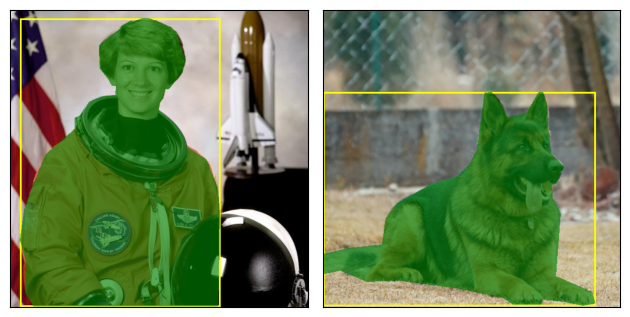
As baseline, let’s have a look at a sample without transformations:
plot([dataset[0], dataset[1]])
Transforms#
Let’s now define our pre-processing transforms. All the transforms know how to handle images, bouding boxes and masks when relevant.
Transforms are typically passed as the transforms parameter of the
dataset so that they can leverage multi-processing from the
:class:torch.utils.data.DataLoader.
transforms = v2.Compose(
    [
        v2.ToImage(),
        v2.RandomPhotometricDistort(p=1),
        v2.RandomZoomOut(fill={tv_tensors.Image: (123, 117, 104), "others": 0}),
        v2.RandomIoUCrop(),
        v2.RandomHorizontalFlip(p=1),
        v2.SanitizeBoundingBoxes(),
        v2.ToDtype(torch.float32, scale=True),
    ]
)

dataset = datasets.CocoDetection(IMAGES_PATH, ANNOTATIONS_PATH, transforms=transforms)
dataset = datasets.wrap_dataset_for_transforms_v2(dataset, target_keys=["boxes", "labels", "masks"])
loading annotations into memory...
Done (t=0.00s)
creating index...
index created!
A few things are worth noting here:
We’re converting the PIL image into a :class:
~torchvision.transforms.v2.Imageobject. This isn’t strictly necessary, but relying on Tensors (here: a Tensor subclass) willgenerally be faster <transforms_perf>.We are calling :class:
~torchvision.transforms.v2.SanitizeBoundingBoxesto make sure we remove degenerate bounding boxes, as well as their corresponding labels and masks. :class:~torchvision.transforms.v2.SanitizeBoundingBoxesshould be placed at least once at the end of a detection pipeline; it is particularly critical if :class:~torchvision.transforms.v2.RandomIoUCropwas used.
Let’s look how the sample looks like with our augmentation pipeline in place:
plot([dataset[0], dataset[1]])
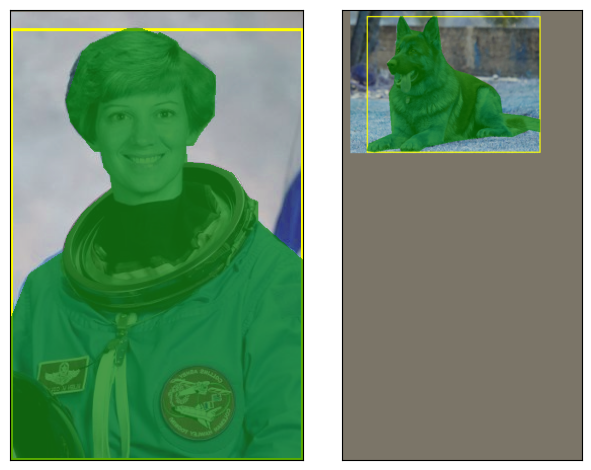
We can see that the color of the images were distorted, zoomed in or out, and flipped. The bounding boxes and the masks were transformed accordingly. And without any further ado, we can start training.
Data loading and training loop#
Below we’re using Mask-RCNN which is an instance segmentation model, but everything we’ve covered in this tutorial also applies to object detection and semantic segmentation tasks.
data_loader = torch.utils.data.DataLoader(
    dataset,
    batch_size=2,
    # We need a custom collation function here, since the object detection
    # models expect a sequence of images and target dictionaries. The default
    # collation function tries to torch.stack() the individual elements,
    # which fails in general for object detection, because the number of bounding
    # boxes varies between the images of the same batch.
    collate_fn=lambda batch: tuple(zip(*batch)),
)

model = models.get_model("maskrcnn_resnet50_fpn_v2", weights=None, weights_backbone=None).train()

for imgs, targets in data_loader:
    loss_dict = model(imgs, targets)
    # Put your training logic here

    print(f"{[img.shape for img in imgs] = }")
    print(f"{[type(target) for target in targets] = }")
    for name, loss_val in loss_dict.items():
        print(f"{name:<20}{loss_val:.3f}")

## do inference:
# Set the model to evaluation mode
model.eval()

# Use torch.no_grad() to avoid computing gradients
with torch.no_grad():
    for imgs, _ in data_loader:
        # Get the predictions
        predictions = model(imgs)

        # Process the predictions
        for i, prediction in enumerate(predictions):
            print(f"Image {i}:")
            print(f"Boxes: {prediction['boxes']}")
            print(f"Labels: {prediction['labels']}")
            print(f"Masks: {prediction.get('masks', 'No masks')}")
[img.shape for img in imgs] = [torch.Size([3, 512, 512]), torch.Size([3, 409, 493])]
[type(target) for target in targets] = [<class 'dict'>, <class 'dict'>]
loss_classifier     4.721
loss_box_reg        0.006
loss_mask           0.734
loss_objectness     0.691
loss_rpn_box_reg    0.036
[{'boxes': tensor([], size=(0, 4)), 'labels': tensor([], dtype=torch.int64), 'scores': tensor([]), 'masks': tensor([], size=(0, 1, 512, 512))}, {'boxes': tensor([], size=(0, 4)), 'labels': tensor([], dtype=torch.int64), 'scores': tensor([]), 'masks': tensor([], size=(0, 1, 676, 700))}]
Image 0:
Boxes: tensor([], size=(0, 4))
Labels: tensor([], dtype=torch.int64)
Masks: tensor([], size=(0, 1, 512, 512))
Image 1:
Boxes: tensor([], size=(0, 4))
Labels: tensor([], dtype=torch.int64)
Masks: tensor([], size=(0, 1, 676, 700))
Training References#
From there, you can check out the torchvision references where you’ll find the actual training scripts we use to train our models.
Disclaimer The code in our references is more complex than what you’ll need for your own use-cases: this is because we’re supporting different backends (PIL, tensors, TVTensors) and different transforms namespaces (v1 and v2). So don’t be afraid to simplify and only keep what you need.