pre-trained model for object localization#
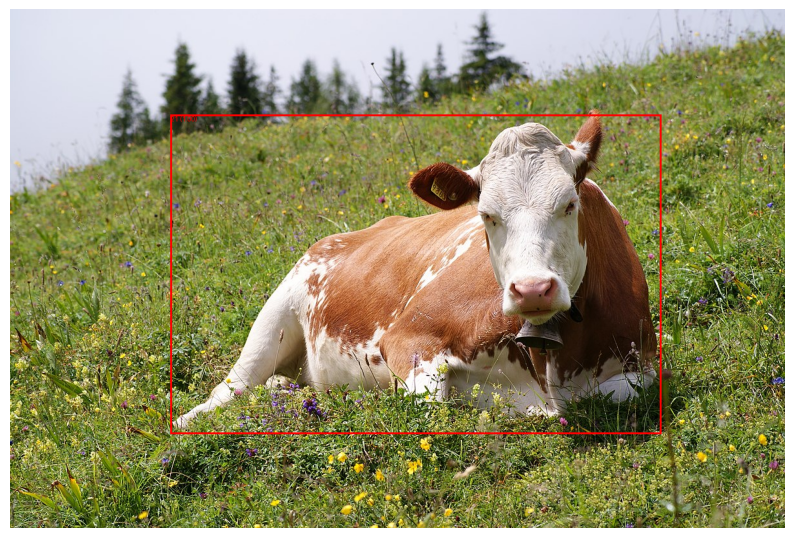
This code snippet demonstrates loading a pre-trained Faster R-CNN model, preprocessing an image, and performing object detection to get the bounding box coordinates of the detected object.
import torch
import torchvision
from PIL import Image, ImageDraw
from torchvision import transforms
import matplotlib.pyplot as plt

# Load a pre-trained model
model = torchvision.models.detection.fasterrcnn_resnet50_fpn(pretrained=True)
model.eval()


COCO_INSTANCE_CATEGORY_NAMES = [
    '__background__', 'person', 'bicycle', 'car', 'motorcycle', 'airplane', 'bus',
    'train', 'truck', 'boat', 'traffic light', 'fire hydrant', 'N/A', 'stop sign',
    'parking meter', 'bench', 'bird', 'cat', 'dog', 'horse', 'sheep', 'cow', 'elephant',
    'bear', 'zebra', 'giraffe', 'N/A', 'backpack', 'umbrella', 'N/A', 'N/A', 'handbag',
    'tie', 'suitcase', 'frisbee', 'skis', 'snowboard', 'sports ball', 'kite', 'baseball bat',
    'baseball glove', 'skateboard', 'surfboard', 'tennis racket', 'bottle', 'N/A', 'wine glass',
    'cup', 'fork', 'knife', 'spoon', 'bowl', 'banana', 'apple', 'sandwich', 'orange', 'broccoli',
    'carrot', 'hot dog', 'pizza', 'donut', 'cake', 'chair', 'couch', 'potted plant', 'bed', 'N/A',
    'dining table', 'N/A', 'N/A', 'toilet', 'N/A', 'tv', 'laptop', 'mouse', 'remote', 'keyboard',
    'cell phone', 'microwave', 'oven', 'toaster', 'sink', 'refrigerator', 'N/A', 'book', 'clock',
    'vase', 'scissors', 'teddy bear', 'hair drier', 'toothbrush'
]

# Preprocess the image
transform = transforms.Compose([
    transforms.ToTensor(),
])
image_path = '/tmp/cow.jpg'
image = Image.open(image_path)
image_tensor = transform(image).unsqueeze(0)  # Add batch dimension

# Perform object detection
with torch.no_grad():
    predictions = model(image_tensor)

# Extract bounding box coordinates and labels for the first detected object
boxes = predictions[0]['boxes']
labels = predictions[0]['labels']
scores = predictions[0]['scores']

# Threshold for displaying predictions
threshold = 0.5

# Draw bounding box and label on the image
draw = ImageDraw.Draw(image)
for box, label, score in zip(boxes, labels, scores):
    if score >= threshold:
        x1, y1, x2, y2 = box
        draw.rectangle([x1, y1, x2, y2], outline="red", width=3)
        text = f"{COCO_INSTANCE_CATEGORY_NAMES[label.item()]}: {score:.2f}"
        print(text)
        draw.text((x1, y1), f"{label.item()} ({score:.2f})", fill="red")

# Convert image for displaying with matplotlib
plt_image = transforms.ToTensor()(image).permute(1, 2, 0).numpy()

# Display the image in Jupyter notebook
plt.figure(figsize=(10, 10))
plt.imshow(plt_image)
plt.axis('off')
plt.show()
/data/solai/venvMamabaFixel/lib/python3.11/site-packages/torchvision/models/_utils.py:208: UserWarning: The parameter 'pretrained' is deprecated since 0.13 and may be removed in the future, please use 'weights' instead.
  warnings.warn(
/data/solai/venvMamabaFixel/lib/python3.11/site-packages/torchvision/models/_utils.py:223: UserWarning: Arguments other than a weight enum or `None` for 'weights' are deprecated since 0.13 and may be removed in the future. The current behavior is equivalent to passing `weights=FasterRCNN_ResNet50_FPN_Weights.COCO_V1`. You can also use `weights=FasterRCNN_ResNet50_FPN_Weights.DEFAULT` to get the most up-to-date weights.
  warnings.warn(msg)
cow: 1.00